
Quick answer: Plan your Shopify product photos around the questions a buyer would ask in a store: what is it, how would I use it, how well is it made, and how big is it? Answer them in that order. Start with a main image of the whole product, which Shopify shows on collection pages, in the cart, at checkout, and on the home page. Then add an in-use shot, a detail close-up, and a scale shot, followed by variants, alternate angles, and packaging. Shopify doesn’t set a minimum number of photos, while Amazon recommends a main image plus at least six additional images and a video.
- Your product gallery, slot by slot
- Slot 1: The main image
- Slot 2: The product in use
- Slot 3: Detail close-ups
- Slot 4: Scale
- Slot 5 and beyond: Variants, alternate angles, and packaging
- How many photos does a Shopify product need?
- How ModoAI approaches it
- A gallery checklist
- FAQs
Your product gallery, slot by slot
Shopify’s photography guide defines the photo types. The order above is our recommendation.
Slot 1: The main image
Shopify treats the first photo in your gallery as the product’s featured image. It appears on collection pages, in the cart, at checkout, and on the home page, so it does most of the work of earning the click.- Show the whole product. Keep every part inside the frame.
- Pick the angle that shows its shape. Shopify notes that a three-quarter view, the front plus one side, is often the most flattering angle for products with depth.
- Match your other main images. Shopify recommends one aspect ratio so main images display at the same size on collection pages.
Slot 2: The product in use
This slot shows the product being used. Shopify notes that photos of a product in use help buyers imagine owning and using it. Shopify’s own examples are a good starting point:- Hiking boots on someone’s feet during a hike
- Apparel on someone walking in a fitting setting
Slot 3: Detail close-ups
A detail shot does the job a buyer would do with their hands in a store. Shopify suggests zooming in on textures, materials, stitching, finishes, labels, and unique design elements. For higher-priced products, these shots build confidence that the product is worth the price.- Fabric weave, wood grain, or leather surface
- Zippers, handles, seams, and edges
- Labels, ingredients, or instructions, sharp enough to read
Slot 4: Scale
A scale shot shows size next to something familiar. Shopify points out that it helps buyers set accurate expectations and can cut down on returns. It matters most for jewelry, home goods, and furniture.- The product in a hand
- Worn by a person
- In a room, next to other furniture
- Beside an everyday object like a phone or a book
Slot 5 and beyond: Variants, alternate angles, and packaging
From here, add only what your product needs.- Variants: Shopify lets you assign one image to each variant. When a buyer selects that variant, its image becomes the preview. Shoot every variant the same way, so the only thing that changes is the variant itself.
- Alternate angles: Add a back view when the back matters, such as clothing, bags, or electronics with ports.
- Packaging: Group and packaging shots show bundles, gift sets, and what comes in the box.
- 360-degree views: Shopify suggests these for high-consideration products like furniture and electronics.
How many photos does a Shopify product need?
Shopify doesn’t set a minimum number of photos. A single product can hold up to 250 images, 3D models, or videos. For a benchmark, Amazon recommends a main image plus at least six additional images and a video. We recommend starting with slots 1 to 5, then adding a photo only when it answers a buyer question the others don’t. See our Shopify product photo guide for image sizes and file specs.How ModoAI approaches it
ModoAI works like an in-house Creative Team for your product photos. You upload one front-view photo of your product. ModoAI analyzes the product, recommends styles and explains why, and proposes concepts built to sell. You pick a concept, and ModoAI creates the shots. For your gallery, that one photo can fill the first slots: the main image, a scene that shows the product in use, and a shot that shows its real size. See all six ModoAI styles, or learn how ModoAI works.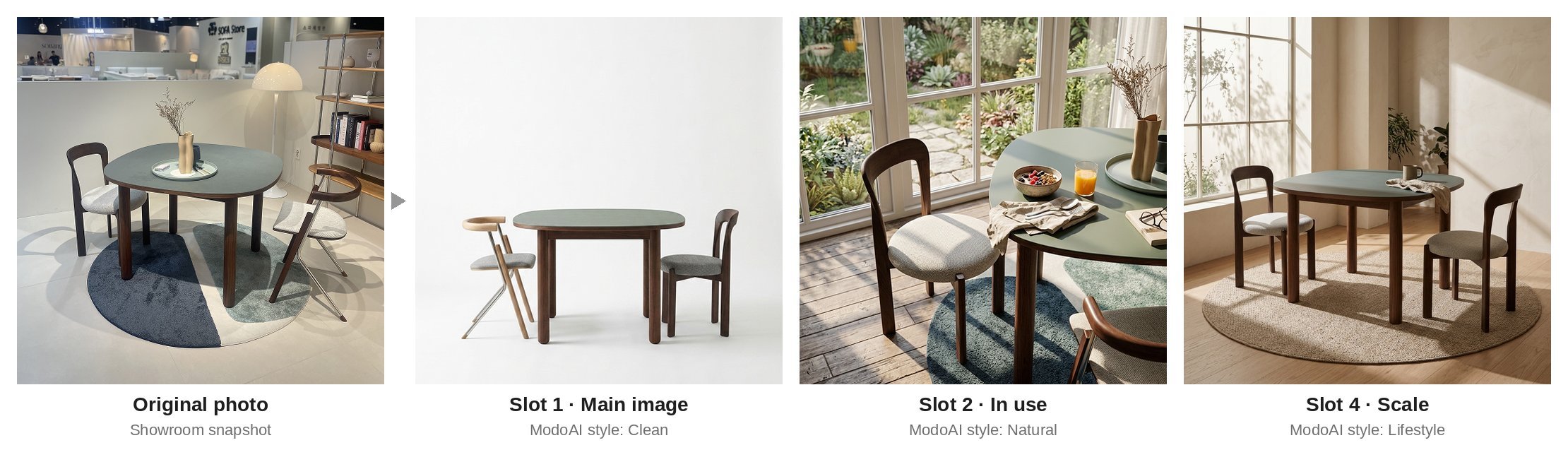
See what ModoAI proposes for your product. Try ModoAI free →
A gallery checklist
- Slot 1 shows the whole product, with nothing cut off
- Every main image in the collection shares one aspect ratio
- At least one photo shows the product in use
- One close-up shows material or finish
- One photo shows real size
- Each variant has its own assigned image
- Each photo answers a question the buyer actually has
Shopify product photo ideas: FAQs
How many photos should a Shopify product have?
Shopify sets no minimum, and a product can hold up to 250 media items. Amazon recommends a main image plus at least six additional images and a video. Start with the five slots above and add photos that answer new buyer questions.What should the first product image be?
The whole product in full view, at an angle that shows its shape, in the same aspect ratio as your other main images. Shopify shows it on collection pages, in the cart, at checkout, and on the home page.Can I add more than one image to a variant?
Shopify lets you assign one image to each variant, which becomes the preview when a buyer selects it. Add more photos of that variant to the main gallery, where buyers can scroll through them.Do I need a model for my product photos?
For apparel, jewelry, and accessories, photos on people help buyers see how the product will look on them. For other products, a lifestyle or scale shot can do the same job.How does ModoAI help fill a product gallery?
You upload one front-view photo. ModoAI analyzes the product, recommends styles and explains why, and proposes concepts for your main image and the scenes that follow. You choose one. The quickstart walks through each step. The more buyer questions your gallery answers, the closer a buyer gets to checkout. Related: Shopify Product Photos Without a Photographer (2026 Guide), Shopify Product Photo Backgrounds: White, Studio, or Lifestyle? (2026 Guide)
Start with one product photo
ModoAI analyzes your product and proposes concepts built to sell.