
Quick answer: Good Shopify lifestyle product photos place the product in a setting your buyer already knows, with the product as the main subject. Shopify’s examples include a candle on a bedside table and skin care products around a bathroom sink. Choose an indoor or outdoor location that matches where your buyers spend time, use natural light, and add a few everyday items so the scene feels lived in. Keep colors true to life and skip props or edits that make the scene look staged. Shopify describes lifestyle product photos as products used, worn, or displayed in a real-world setting, so a scene doesn’t always need a person.
- Lifestyle photography vs. lifestyle product photography
- Scene ideas by product type
- Indoor or outdoor?
- How to style the scene
- Mistakes that make a scene look staged
- How ModoAI approaches it
- A pre-upload checklist
- FAQs
Lifestyle photography vs. lifestyle product photography
Source: Shopify, What Is Lifestyle Photography? Examples & Tips
On a product page, the product should stay the main subject, whether or not a person is in the shot.
Scene ideas by product type
Every row follows the same pattern: each scene shows the product where it gets used, in a place the buyer recognizes at a glance. For furniture, Shopify notes that a styled room also helps show scale and quality. A dedicated scale shot still has its own slot in your gallery, covered in our Shopify product photo ideas guide.
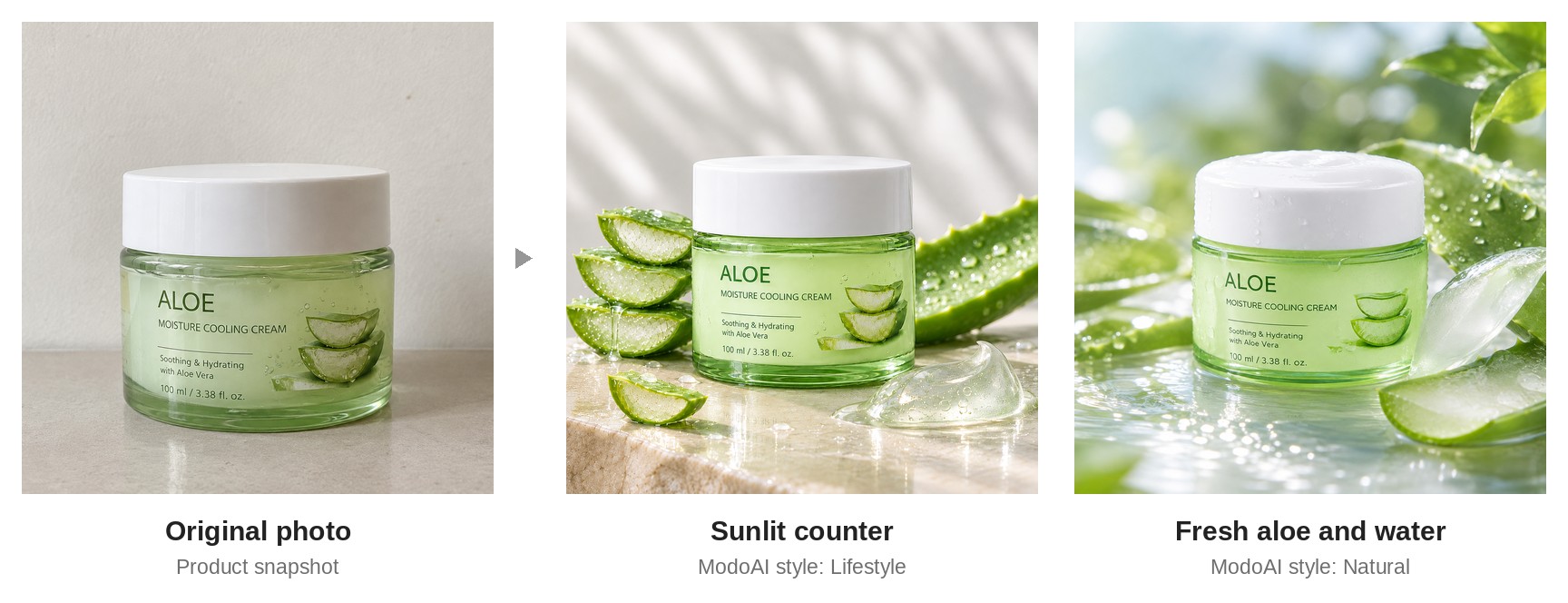 One product photo, two lifestyle scenes, all created with ModoAI.
Indoor or outdoor?
Shopify sorts lifestyle locations into two groups:- Indoor: a living room, bedroom, or kitchen
- Outdoor and on location: a park, a café, or a trail
How to style the scene
Use these three tips from Shopify’s guide, plus one of ours:- Light: Plenty of natural light sets the atmosphere.
- Everyday items: Books, plants, or a coffee mug make a scene feel lived in.
- Brand colors: Choose a location and props that complement your brand’s color palette, like a forest for a brand built on greens and browns.
- Product first: We recommend props that support the scene without covering the product or pulling the eye away from it.
Mistakes that make a scene look staged
Shopify lists a few common pitfalls in lifestyle photography. Three of them apply directly to product scenes:- Overly staged scenes. Choose locations that look lived in rather than arranged for the camera, and use props that fit, like real food in a kitchen shot.
- Poor lighting. Shoot during golden hour when you can, and soften harsh sunlight with shade or reflectors.
- Too much editing. Keep colors true to life and avoid heavy filters.
How ModoAI approaches it
ModoAI works like an in-house Creative Team for your product photos. You upload one front-view photo of your product. ModoAI analyzes the product, recommends styles and explains why, and proposes concepts built to sell. You pick a concept, and ModoAI creates the shots. For lifestyle shots, two ModoAI styles place your product in a scene: Lifestyle for real-life indoor and outdoor settings, and Natural for natural landscapes. Concepts start from your product’s category, features, and target buyers, so the scene fits the people most likely to buy. ModoAI creates product-only scenes and doesn’t generate people. The product stays the main subject of every scene. See each style in our style guide, or check which styles suit your product in Results by category.See what ModoAI proposes for your product. Try ModoAI free →
A pre-upload checklist
- The product is the main subject, with nothing covering it
- The setting is a place where your buyer uses this product
- Light looks natural, with no harsh sunlight
- Props are everyday items that fit the scene and your brand colors
- The product’s color matches your main image
- Each photo answers a question the buyer actually has
Shopify lifestyle product photos: FAQs
What is a lifestyle product photo?
A photo of a product used, worn, or displayed in a real-world setting instead of against a plain background. Shopify separates it from lifestyle photography, which focuses on people. In a lifestyle product photo, the product stays the central subject.Where should I shoot lifestyle product photos?
Indoors, in a living room, bedroom, or kitchen, or outdoors, in a park, a café, or on a trail. Shopify suggests choosing locations that reflect where your buyers already spend time.How do I keep lifestyle photos on-brand?
Use props and locations that complement your brand colors, and keep colors true to life when you edit. Shopify also suggests a photography style guide that records saturation, color, lighting, and subject matter. Learn how to write one in our consistent product photos guide.Can I create lifestyle product photos without a photoshoot?
Yes. With ModoAI, you upload one front-view photo and choose from Lifestyle or Natural concepts made for your product. ModoAI creates product-only scenes, as explained in our human figures policy. When a buyer can picture your product in their own life, they’re one step closer to checkout. Related: Shopify Product Photo Ideas: What to Put in Each Image Slot (2026 Guide), Shopify Product Photo Backgrounds: White, Studio, or Lifestyle? (2026 Guide), Consistent Product Photos for Shopify: How to Match Your Whole Catalog (2026 Guide)
Start with one product photo
ModoAI analyzes your product and proposes concepts built to sell.